
The IGNOU synopsis cover page is the first page of your research proposal and should present the essential project information in a clear academic format. It generally includes the title of the research topic, student name, enrollment number, programme details, study centre information, supervisor details, and other required university information.
A properly prepared cover page gives your IGNOU synopsis a professional appearance and makes it easier for the evaluator to identify your project.
What Is an IGNOU Synopsis Cover Page?
The IGNOU synopsis cover page is the opening page of your synopsis document. It introduces your proposed research project before the reader reaches sections such as the introduction, research objectives, methodology, literature review, and bibliography.
The cover page should be simple and properly organized. Students should avoid adding unnecessary designs, decorative elements, or information that is not required for their particular programme.
The exact requirements can vary depending on the IGNOU programme, school, project guidelines, and instructions provided by the university or concerned study centre. Therefore, students should always check the latest instructions applicable to their programme before finalizing the page.
What Information Should Be Included?
A standard IGNOU synopsis cover page normally contains several important details. These details help establish the identity of the student and provide basic information about the proposed research.
1. Title of the Research Project
The research title should be placed prominently on the cover page because it identifies the subject of your proposed study.
Your title should match the approved or finalized research topic used throughout the synopsis. Avoid using a different title on the cover page and another title inside the document.
The title should be specific enough to communicate the main subject, population, location, or variables involved in your research.
For example:
A Study on Tourist Satisfaction and Service Quality Among Domestic and International Visitors in Shimla Tourism Sector
A research title should not be unnecessarily long. However, shortening the title should not remove important information about the proposed study.
2. Student Name
Your full name should appear clearly on the cover page.
The name should preferably be written in the same form used in your IGNOU academic records. Avoid using nicknames, shortened names, or different spellings.
This helps prevent confusion when your synopsis is reviewed or submitted along with other project documents.
3. Enrollment Number
Your IGNOU enrollment number is an important identification detail and should be entered carefully.
Check every digit before submitting your synopsis because an incorrect enrollment number can create unnecessary problems during project processing.
4. Programme Name and Programme Code
The cover page should identify the programme for which you are preparing the synopsis.
Depending on the applicable IGNOU instructions, you may include both the programme name and programme code.
For example:
Master of Commerce (MCOM)
or the relevant programme name and code applicable to your course.
Students should verify the correct programme code from their current IGNOU records and programme documentation rather than copying a code from an unrelated sample.
5. Study Centre Details
If your programme instructions require study centre information, include the relevant study centre name and code on the cover page.
Make sure the information corresponds to your current academic records.
Students sometimes copy study centre details from old project samples available online. This can result in outdated or incorrect information, so checking your current records is important.
6. Regional Centre
Some IGNOU project formats may require information about the relevant Regional Centre.
If your programme guidelines require it, provide the Regional Centre name and other requested details accurately.
Do not add unnecessary regional centre information simply because it appears on another student’s synopsis cover page.
7. Supervisor or Guide Details
If your project format requires supervisor information, include the supervisor’s name and relevant designation as instructed.
For example:
Under the Guidance of
Dr. [Supervisor Name]
[Designation]
The supervisor’s name should be written exactly as provided by the supervisor or according to the applicable project documentation.
8. School or Department
Where required by the programme guidelines, the relevant IGNOU School or Department can also be mentioned.
The exact wording should follow the current instructions for your programme.
This is particularly important because IGNOU has different schools and programmes with different project requirements.
Basic Structure of an IGNOU Synopsis Cover Page
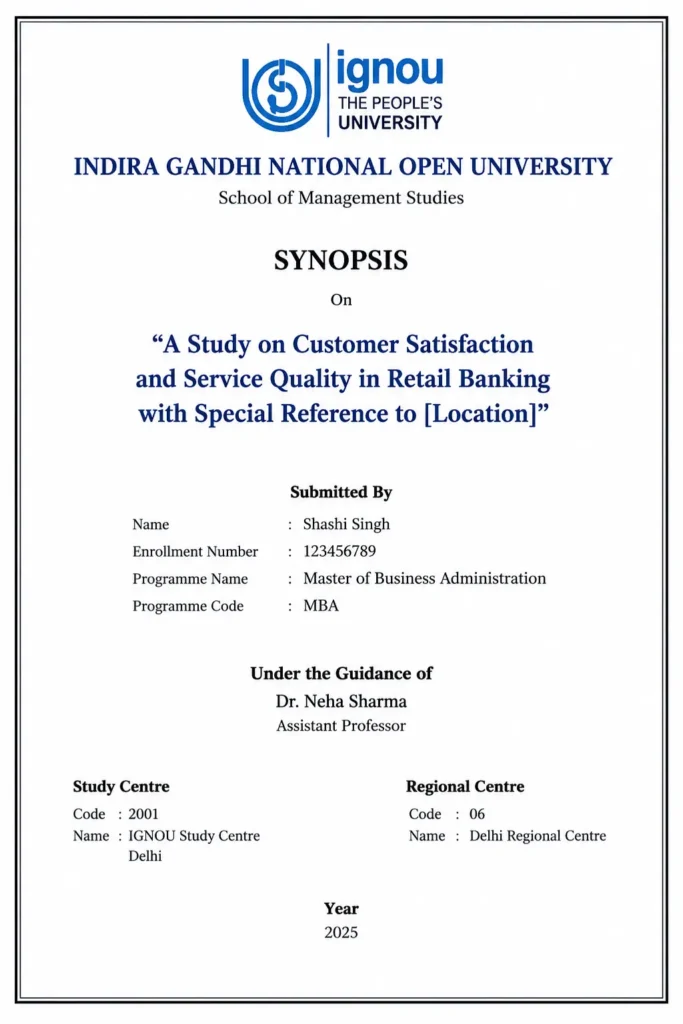
The information should be arranged in a logical order rather than simply placing all details randomly on the first page.
A basic structure can look like this:
INDIRA GANDHI NATIONAL OPEN UNIVERSITY
[Relevant School Name]
SYNOPSIS
Title of the Research Project
“Your Research Topic”
Submitted By
Student Name
Enrollment Number
Programme Name and Code
Under the Guidance of
Supervisor Name
Designation
Study Centre: [Name and Code]
Regional Centre: [Name, if required]
Year: [Applicable Year]
This is a general structure rather than a universal IGNOU template. Your programme’s current project guidelines should take priority if they prescribe a different arrangement.
How Should the Cover Page Be Formatted?
The cover page should look clean and professional. Good formatting makes the information easier to read without making the page unnecessarily decorative.
Use a Clear Font
Use a professional and readable font throughout the synopsis. Common academic fonts such as Times New Roman are generally suitable unless your programme provides different formatting instructions.
The title can be made larger than the remaining text so that the research topic is immediately visible.
Keep the Title Prominent
The research title should receive greater visual emphasis than ordinary information such as the enrollment number or study centre.
You can use bold formatting for the title, but excessive capitalization and decorative fonts should generally be avoided.
Maintain Proper Spacing
Do not squeeze every piece of information into a small area.
Leave sufficient space between the university name, synopsis heading, research title, student information, supervisor details, and other sections.
Balanced spacing makes the cover page look more professional.
Use Center Alignment Carefully
A traditional academic cover page often uses centered text. This can work well for the university name, synopsis heading, research title, and student information.
However, the exact alignment should follow your programme’s prescribed format if one is provided.
Avoid Excessive Design
Your IGNOU synopsis is an academic document rather than a promotional brochure.
Avoid unnecessary:
- Background images
- Multiple colours
- Decorative borders
- Fancy fonts
- Clip art
- Large logos
- Unrelated graphics
- Excessive styling
A simple academic presentation is usually the safer choice.
Should You Add the IGNOU Logo?
Students should be careful when adding logos to academic documents.
If the current IGNOU project or synopsis guidelines provide a prescribed cover page containing the university logo, follow those instructions.
If there is no requirement for a logo, avoid assuming that adding a large logo is necessary. The latest official programme instructions should always take priority over templates found on third party websites.
Common Mistakes on an IGNOU Synopsis Cover Page
Small mistakes on the first page can make an otherwise good synopsis look poorly prepared.
Using an Incorrect Project Title
Your cover page title should match the title used throughout the synopsis.
Changing words between the cover page, objectives, methodology, and other sections can create inconsistency.
Entering the Wrong Enrollment Number
Always verify your enrollment number before submitting the document.
One incorrect digit can make the student’s academic identification difficult.
Copying an Old Template
Many IGNOU synopsis and project templates available online were created for earlier sessions or different programmes.
Do not assume that every template found online is currently applicable.
Adding Too Much Information
A cover page should provide essential identification information.
There is no need to include lengthy descriptions, personal statements, acknowledgements, or research methodology on the first page.
Using Unprofessional Fonts
Decorative fonts may make the page look attractive, but they can reduce readability and make the document look less academic.
Keep the formatting simple and consistent.
IGNOU Synopsis Cover Page Checklist
Before submitting your synopsis, check the following:
- Research title is correct and consistent
- Student name is correctly spelled
- Enrollment number is accurate
- Programme name is correct
- Programme code is correct where required
- Supervisor details are accurate where required
- Study centre details are correct where required
- Regional centre details are included where required
- Required school or department information is included
- Font is readable
- Spacing is consistent
- Page is free from unnecessary decorations
- Current programme guidelines have been checked
Frequently Asked Questions
What is written first on an IGNOU synopsis cover page?
The university name is generally placed at the top, followed by the relevant school or programme information and the synopsis heading. The research title and student details then appear according to the applicable format.
Should the IGNOU synopsis cover page have a logo?
A logo should be included only when it is required or shown in the applicable official format. Students should follow their current programme instructions rather than relying on an old online template.
Should the research title be in bold?
Yes, making the research title bold and slightly larger can improve readability. However, the title should remain professional and should not use excessive decorative formatting.
Can I design my IGNOU synopsis cover page in Canva?
You can use design software to prepare a document, but the final cover page should maintain a simple academic appearance. Avoid excessive graphics, colours, decorative fonts, or layouts that differ significantly from prescribed university requirements.
Can the cover page be different for different IGNOU programmes?
Yes. IGNOU programmes can have different project and synopsis requirements. Students should therefore follow the instructions applicable to their specific programme rather than assuming that one cover page format works for every IGNOU course.
Where can I check the latest IGNOU project requirements?
Students should check the official IGNOU website and current programme or project guidelines for the most relevant requirements before preparing and submitting their synopsis.
Final Thoughts
The IGNOU synopsis cover page does not need complicated formatting to look professional. The most important things are accurate student information, a clear research title, correct programme details, appropriate supervisor information, and a clean academic layout.
Before finalizing the page, compare your cover page with the latest instructions applicable to your programme. This is more reliable than simply downloading an old synopsis format from the internet.
A well structured first page creates a professional beginning for your synopsis and helps ensure that the basic details of your proposed research are presented clearly.